
Microsoft Zen-Like Minimalism

The New Outlook: A Masterclass in Zen-Like Minimalism and Existential Sign-In Screens
There are few constants in this chaotic universe. The sun will rise in the east, toast will always land butter-side down, and Microsoft will absolutely, without fail, deliver a brand-new software update that treats basic operational functionality as a completely optional luxury.
Enter the updated mail app, "Outlook." It was designed to replace your functional, perfectly adequate email client with something more modern, more integrated, and vastly superior. Instead, it has arrived with a spectacular bang, proving that when it comes to endless bugs and beautifully broken user interfaces, the good people at Microsoft still reign supreme.
People often say controversial things are like Marmite—you either love it or you hate it. But the new Outlook isn't Marmite. With Marmite, you at least get exactly what it says on the jar. With Outlook, you open the jar expecting breakfast and find a void that stares back into your soul.
The Ultimate Choice:
Sign In, But Make It Impossible
The true brilliance of Microsoft’s software engineering prowess is on full display before you even manage to look at an email. The bugs aren't hiding deep within the calendar sub-menus or the advanced filter settings; they are proudly front and centre on the very first sign-in screen.
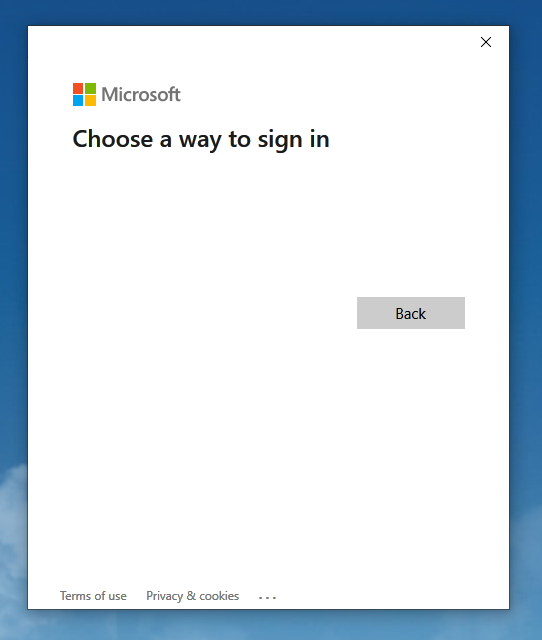
Let us gaze upon the absolute masterclass in user experience design presented in the image:
- The Illusion of Free Will: The window boldly flashes the title "Choose a way to sign in." This is an incredibly moving, philosophical statement. It forces the user to reflect on the nature of choice itself. Why? Because beneath this grand invitation, there is absolutely nothing to choose from. The entire central canvas is a pristine, blindingly white expanse of nothingness. There are no text boxes, no username fields, no single-sign-on buttons, and no password prompts. There is only the void.
- The Existential 'Back' Button: Marooned on the right side of this snow-white desert sits a single, solitary grey rectangle that simply reads "Back." Back to where, Microsoft? Back to a time when our email applications actually had buttons? Back to the 1990s when we used pen and paper? Clicking it feels less like a navigational command and more like a desperate, retrospective plea for a better life.
- The Tiny Legal Lifelines: Tucked safely away at the absolute bottom of this broken window are the links for "Terms of use" and "Privacy & cookies." It is comforting to know that while the application cannot physically manifest a text box to let you read your messages, it ensures the legal department is fully represented and legally protected from your mounting frustration.
Efficiency Redefined
Think of the sheer carbon footprint reduction Microsoft has achieved here. By engineering a sign-in screen that completely prevents you from logging in, they have successfully eliminated the server strain of loading your inbox altogether. You cannot receive spam if you cannot sign in. You cannot accidentally click a phishing link if your username field is invisible. It is, technically speaking, the most secure email client ever created.
Ultimately, the new Outlook serves as a beautiful reminder of why we continue to click "Update Now" year after year. It keeps us humble, it tests our patience, and it ensures that the simple act of checking a flight confirmation remains a thrilling game of chance.
So, raise a glass to the endless cycle of software updates. The future is here, it’s completely blank, and your options are strictly limited to going "Back."