
Breadcrumbs

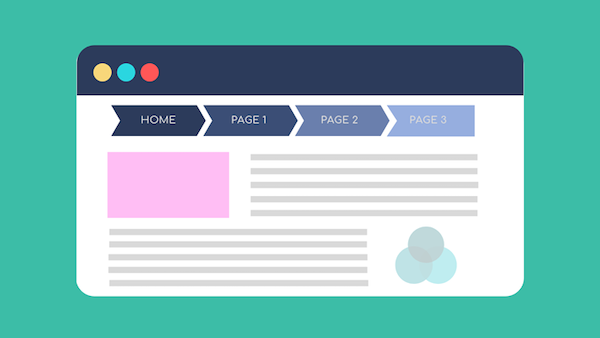
The Hansel and Gretel Method of Web Design:
How Electronic Breadcrumbs Keep You from Dying in the Digital Forest
In the vast, terrifying wilderness of the modern internet, it is remarkably easy to lose your mind. One minute you are looking at a reasonable product page for a toaster, and forty-five minutes later you are trapped deep within the structural catacombs of a website, staring at an obscure PDF detailing the corporate environmental policy of an appliance factory in Düsseldorf. To prevent users from simply curling up into a fetal position and closing the browser tab out of sheer exhaustion, website designers have gifted us Breadcrumbs: the cutting-edge navigational aid based on a German fairy tale where two children are left to starve in the woods.
According to web-development orthodoxy, this system is a series of links that "show the path a user has taken" and "improve website navigation and user experience." Translated into layman’s terms: it is a row of microscopic text at the top of your screen that serves as a subtle reminder of exactly how far you have wandered from safety.
The Epic Journey of the Click
The classic breadcrumb trail typically appears at the top of a webpage, looking something like this: Home > Appliances > Kitchen > Toasters > 2-Slice > Volcanic Black.
This is designed to give you a profound sense of geographical security within a machine made of light and wires. It whispers, "Fear not, traveler. If you click on 'Kitchen', we will instantly transport you out of this hyper-specific appliance purgatory and dump you back into a general category page filled with blender listings."
It provides an unparalleled ego boost for web developers, who genuinely believe that users sit at home thinking, "Gosh, I really appreciate how accurately this path represents the site's logical directory structure." In reality, the user is just aggressively clicking "Home" because the page layout broke and they cannot find the shopping cart icon anymore.
Pleasing the Almighty Search Engine Gods
We are told that breadcrumbs don’t just help fragile human brains; they also "help search engines understand the site structure and index pages more accurately."
This means that somewhere out there, a multi-billion-dollar, world-dominating automated web-crawler algorithm is crawling through a website, completely baffled by its contents, until it spots Home > Clothes > Socks and goes, "Ah! Of course! Socks are a subcategory of clothes! Bless these digital breadcrumbs, for I was truly blind, but now I see." It’s comforting to know that our most advanced automated intelligences still need a trail of digital crumbs to find their way around a basic e-commerce store.
The Inevitable Flaw in the Trail (Enter the Pigeons)
The fundamental problem with naming a piece of web infrastructure after baked-goods debris is that it ignores the basic laws of nature. In the original fairy tale, the breadcrumbs failed entirely because a flock of hungry pigeons swooped down and devoured them, leaving Hansel and Gretel completely stranded.
The internet mimics life with astonishing accuracy. In the digital ecosystem, the role of the destructive pigeon is played by rogue JavaScript errors, broken hyperlinks, and lazy front-end updates. You will be happily browsing a site, relying on that little trail to keep you grounded, when suddenly a "404 Page Not Found" error swoops down like a rabid wood pigeon, swallows the Appliances link whole, and leaves you utterly stranded in a wasteland of un-indexed broken code.
Furthermore, if you accidentally hit the back button too fast, the breadcrumb logic completely loses its mind, displaying a path that suggests you somehow traveled through the "About Us" page to buy a pair of gardening gloves. It is computational chaos masked as a tidy list.
Ultimately, breadcrumbs are an ideal solution for websites that are far too large and complicated for their own good. They allow us to feel like intrepid explorers mapping a digital continent, rather than distracted humans trying to find a return policy link at 11 PM on a Friday.
Summary

So, next time you track your progress across a website using a string of little greater-than signs, say a quiet prayer that the internet pigeons don't notice your trail. Keep clicking, stay on the path, and try not to think about the witch waiting for you in the checkout funnel.